 English
 Pусский
 Español
Next: How to Set Up a Petal Type Flexo Machine for Shopping Bags | FENGMING
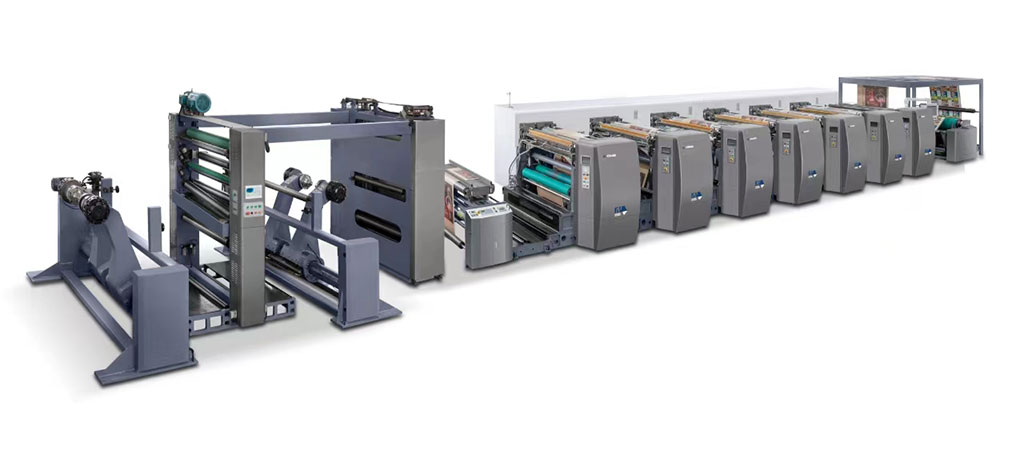
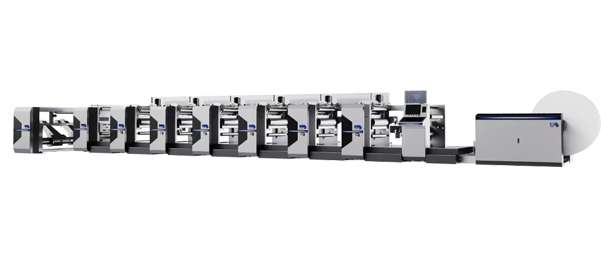
A Flexographic printing machine represents a significant capital investment for any packaging or label converting operation. Like any precision equipment, its longevity and performance depend largely on how well it is cared for on a day-to-day basis. The difference between a press that runs reliably for fifteen years and one that becomes a maintenance nightmare within five often comes down to the daily routines practiced by the operators.
Many printing facilities focus their attention on troubleshooting problems after they appear. But the most successful operations understand that prevention is far more cost-effective than cure. When it comes to a Flexographic printing machine, the daily maintenance steps you take—or fail to take—directly impact everything from print quality to unplanned downtime to the overall lifespan of the equipment.
So what does an effective daily maintenance routine for a Flexographic printing machine actually look like? Let's break down the most critical steps that every operator should be performing, shift after shift.
Before any ink touches the substrate, the operator should conduct a walk-around inspection of the Flexographic printing machine. This is not a casual glance—it's a systematic check for anything that looks out of the ordinary.
Look for signs of ink leaks around the chambered doctor blade system and ink pumps. Check for loose connections on hoses and fittings. Listen for unusual noises during the machine's warm-up cycle—bearing wear, belt slippage, or misaligned components often announce themselves through sound long before they cause a catastrophic failure.
Pay particular attention to the condition of the anilox rollers. These are arguably the most critical components in the entire Flexographic printing machine when it comes to print quality. Look for scratches, visible ink buildup, or any signs of cell damage. A damaged anilox roller will compromise ink transfer and can ruin an entire print run before anyone realizes what's happening.
The impression cylinder deserves equal attention. Check its surface for any nicks, scratches, or embedded debris that could transfer defects to the printed substrate. Even a small imperfection on the impression cylinder can create a recurring print defect that wastes material and frustrates operators.
Of all the daily maintenance tasks for a Flexographic printing machine, cleaning the anilox rollers and doctor blades is arguably the most important—and the most frequently neglected when production schedules get tight.
.The rule is simple: clean the anilox roll immediately after each job ends, while the ink is still wet. Once ink dries in the tiny cells of a ceramic anilox roller, removing it becomes significantly more difficult. Dried ink in the cells reduces the roller's ink-carrying capacity, which directly affects colour density and consistency
Use a soft brush and the appropriate cleaning solution for your ink type. Never use sharp tools or metal scrapers on the anilox surface—the ceramic coating is durable but not indestructible, and scratches will permanently damage the roller's ability to transfer ink evenly.
The doctor blades should also be cleaned or inspected daily. Look for signs of wear, nicks, or chipping along the blade edge. A worn doctor blade will not meter ink properly, leading to inconsistent ink film thickness and potential streaking on the printed substrate. Many operators find that simply flipping or rotating the blade can extend its useful life, but blades showing visible damage should be replaced immediately.
The ink delivery system is the heart of any Flexographic printing machine, and it requires daily attention to keep it functioning reliably.
Start by checking ink levels in the fountain or circulation system. Low ink levels can introduce air into the system, causing foam and inconsistent ink delivery.. More importantly, monitor ink viscosity. Viscosity that drifts outside the recommended range will affect colour strength, dot gain, and overall print quality
.Ink filters should be inspected daily and replaced according to the manufacturer's schedule—ideally at least once a week. A clogged filter restricts flow and can starve the anilox roller of ink, leading to print defects like ghosting or uneven density
At the end of each shift, flush the ink system thoroughly. This means cleaning the ink fountain, the circulating ink tank, and the lines that deliver ink to the chambered doctor blade. Ink left sitting in the system overnight can dry and cause blockages that require significantly more time to clear the next morning.
One best practice that many experienced operators follow: keep the anilox roller rotating and the ink circulating even during short breaks. This simple step prevents ink from settling or drying in the cells and keeps the system ready to resume production immediately.
Web tension control is critical for consistent print quality, and it's something that should be verified at the start of every shift on any Flexographic printing machine.
Check that the web tension settings match the specifications for the substrate being run. Too much tension can stretch the material and cause registration problems; too little tension can lead to wrinkling or web breaks. Modern Flexographic printing machines with servo-driven tension control systems make this adjustment more precise than ever, but the operator still needs to verify that the system is functioning correctly.
Registration accuracy should also be checked with a test pull at the beginning of each shift. Minor registration drift can often be corrected quickly if caught early. Left unaddressed, registration errors can waste significant amounts of material and cause the entire run to be rejected.
A Flexographic printing machine contains dozens of bearings, gears, and moving parts that require regular lubrication. While some lubrication tasks are weekly or monthly, daily checks of lubrication points help catch problems before they cause wear.
.Check the oil levels in gearboxes and any central lubrication systems. Listen for any bearings that sound dry or rough during operation. A bearing that is running hot or making noise is telling you it needs attention—and ignoring that warning will eventually lead to a costly repair
Follow the manufacturer's recommendations for lubrication frequency and the type of lubricant to use. Using the wrong grease or oil can be just as damaging as not lubricating at all. Some components require specific viscosities or additives, and deviating from the specification can actually accelerate wear rather than prevent it.
This might seem obvious, but the importance of a clean operating environment for a Flexographic printing machine cannot be overstated.
.Dust and debris that accumulate on the machine's surface can find their way into moving parts, causing premature wear. Ink splatters that are allowed to dry on the machine frame become difficult to remove and can contaminate future print runs. Paper dust from the substrate can settle on electrical components and sensors, potentially causing short circuits or false readings
At the end of each shift, wipe down the machine's exterior and the surrounding work area. Remove any paper scraps, ink spills, or other debris from the floor and workbenches. A clean working environment is not just about aesthetics—it's about protecting your investment in the Flexographic printing machine and ensuring that it continues to perform at its best.
The final daily maintenance step for any Flexographic printing machine is documentation. What was cleaned? What was inspected? Were any issues found and corrected?
Maintaining a shift log creates an audit trail that is invaluable for troubleshooting recurring problems. When the same print defect appears on multiple jobs, the maintenance log can help identify patterns—perhaps a particular anilox roller is showing signs of wear, or a specific doctor blade type is causing issues with certain inks.
Documentation also ensures consistency across shifts. When operators on different shifts follow the same daily maintenance routine and record their findings, problems are less likely to be overlooked or forgotten. This continuity is essential for getting the most out of any Flexographic printing machine over its lifetime.
The daily maintenance steps outlined above are not complicated. They don't require special tools or extensive technical training. What they do require is discipline and consistency.
A Flexographic printing machine that receives proper daily care will deliver consistent print quality, experience fewer unplanned stoppages, and have a significantly longer service life than one that is neglected. The time invested in daily maintenance—perhaps thirty minutes at the start and end of each shift—pays for itself many times over in reduced waste, fewer repairs, and higher customer satisfaction.
The best time to start a proper daily maintenance routine for your Flexographic printing machine was the day it was installed. The second best time is today.
GET A QUOTE